

New AI Translation Features in Canvas
IMPORTANT UPDATE: This feature has been delayed and will be deployed around November 17, 2025 rather than October 20.
Canvas is rolling out AI-based translation tools for both Discussions and Inbox around October 20, designed to improve accessibility and inclusivity for multilingual users. These features, enabled by default, allow instructors and students to translate text into 10 languages, fostering collaboration in diverse linguistic settings. Instructors can disable the Discussions translation option in the Settings > Feature Options menu of each course if desired.
Discussions and Announcements Translation
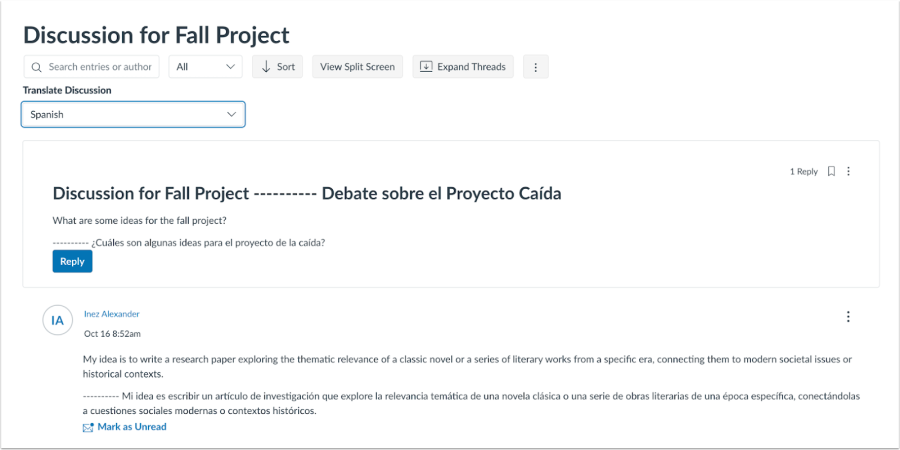
In Discussions, users can translate content by clicking the options button and selecting "Translate Text." They can choose from multiple languages and view the discussion in both the original and translated languages. To remove translations, simply refresh the page. Faculty who prefer not to use this feature can disable it for their own courses by going to Settings > Feature Options and turning off the "Enable AI Translation" option.
Inbox Translation
In the Inbox, users can enable translations for messages that don’t match their preferred language settings. Additionally, when composing a message, users can include a translated version for recipients, selecting between “Primary” or “Secondary” display options. This ensures that recipients can see both the original and translated text if desired.
These tools provide a more inclusive experience, allowing users to communicate and access information with ease, regardless of language preferences.
For more details, check out this video overview of the new AI translation features.